
Usersnap for Product managers
Turn feedback into product impact across the entire PDLC
TL;DR: Usersnap is a customer feedback platform built around the Product Development Lifecycle. Product managers use it to capture user problems, consolidate feedback in one place, analyze sentiment, build a roadmap from validated opportunities, run structured QA, engage users with announcements, and measure feature success after release. Available on all paid plans, with AI-powered features on the AI sidekick add-on. First 20 feedback items are free.
What is Usersnap for product managers?
Usersnap is a customer feedback platform designed for the full Product Development Lifecycle (PDLC). It gives product managers one workspace to collect, structure, analyze, and act on customer input, from raw bug reports through to post-release satisfaction tracking.
Instead of stitching together a survey tool, a bug tracker, a research repository, and a roadmap board, PMs get all of that in one product, with AI-powered automations turning unstructured feedback into prioritized opportunities. The output: roadmap decisions backed by real customer evidence, not assumptions.
Usersnap is available on all paid plans. AI-powered features are part of the AI sidekick add-on. These include Sentiment Sensor, AI-clustered Topics, Hypothesis Generator, Solution Generator, Alloy prototyping, and the Channels data ingestion framework that powers integrations like Zoom and Slack. See the Usersnap pricing page for current plan availability.
How does a product manager use Usersnap across the PDLC?
Usersnap covers all seven stages of the PDLC, from capturing problems to measuring whether the feature you shipped actually solved them.
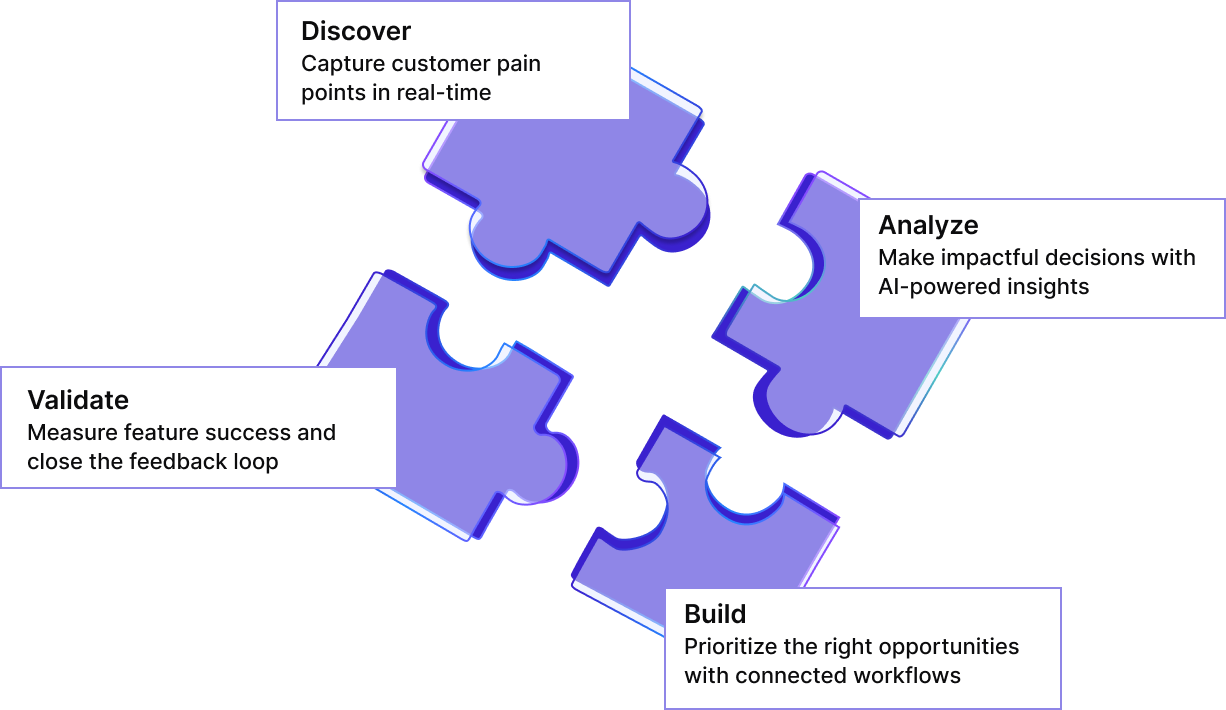
1. Capture customer problems
Every product decision starts with understanding real user pain. Before deciding what to build, identify what users are actually experiencing. Usersnap gives PMs three ways to capture structured input directly from users.
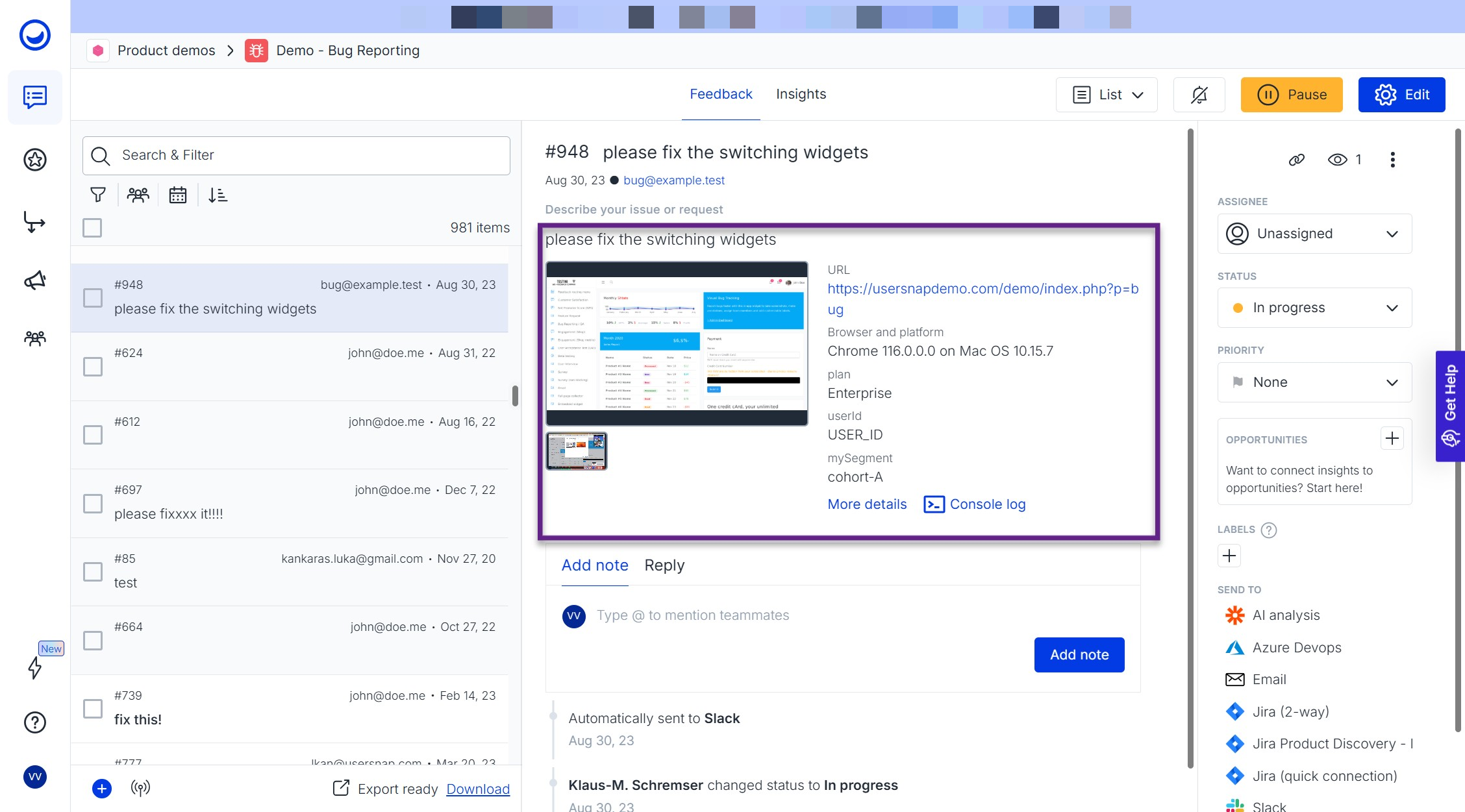
Bug reports and customer issues. Use bug reporting widgets that capture everything a dev team needs to triage without going back to the user:
- Screenshot annotation so the user can point at exactly what's broken
- Screen recording for flows that screenshots can't explain
- Automatic technical metadata (browser, device, location)
- Custom data passed via API (often missed): pass user role, plan tier, account value, or any in-app state into every report
- Console log capture (often missed): surfaces the JavaScript errors developers need without asking the user to copy and paste them
Recommended templates: Bug reporting, Issue reporting.
Example. Enable the bug reporting widget inside your dashboard. When a user reports a broken export button, the dev team receives a screenshot with annotation, console log errors, browser and OS data, and the user's plan (passed via API metadata). Triage time drops from "what happened?" to "here's the fix."
Feature requests. Use the Feature Request widget to let users submit ideas directly inside your product. Collect insights in a simple, UX-friendly way, add conditional questions to dig deeper, and pair each insight with user metadata (plan type, role, account value) via the API.
Example. Add a "Share your idea" entry point inside your product. Keep the first question open-ended: "What would improve your workflow?" Enrich every submission with custom metadata passed via the API:
- Plan type (Free, Growth, Premium)
- User role (admin, editor, viewer)
- Account value (MRR or contract size)
So when a feature request comes in, you immediately see who asked for it and how much they're worth, not just what they want.
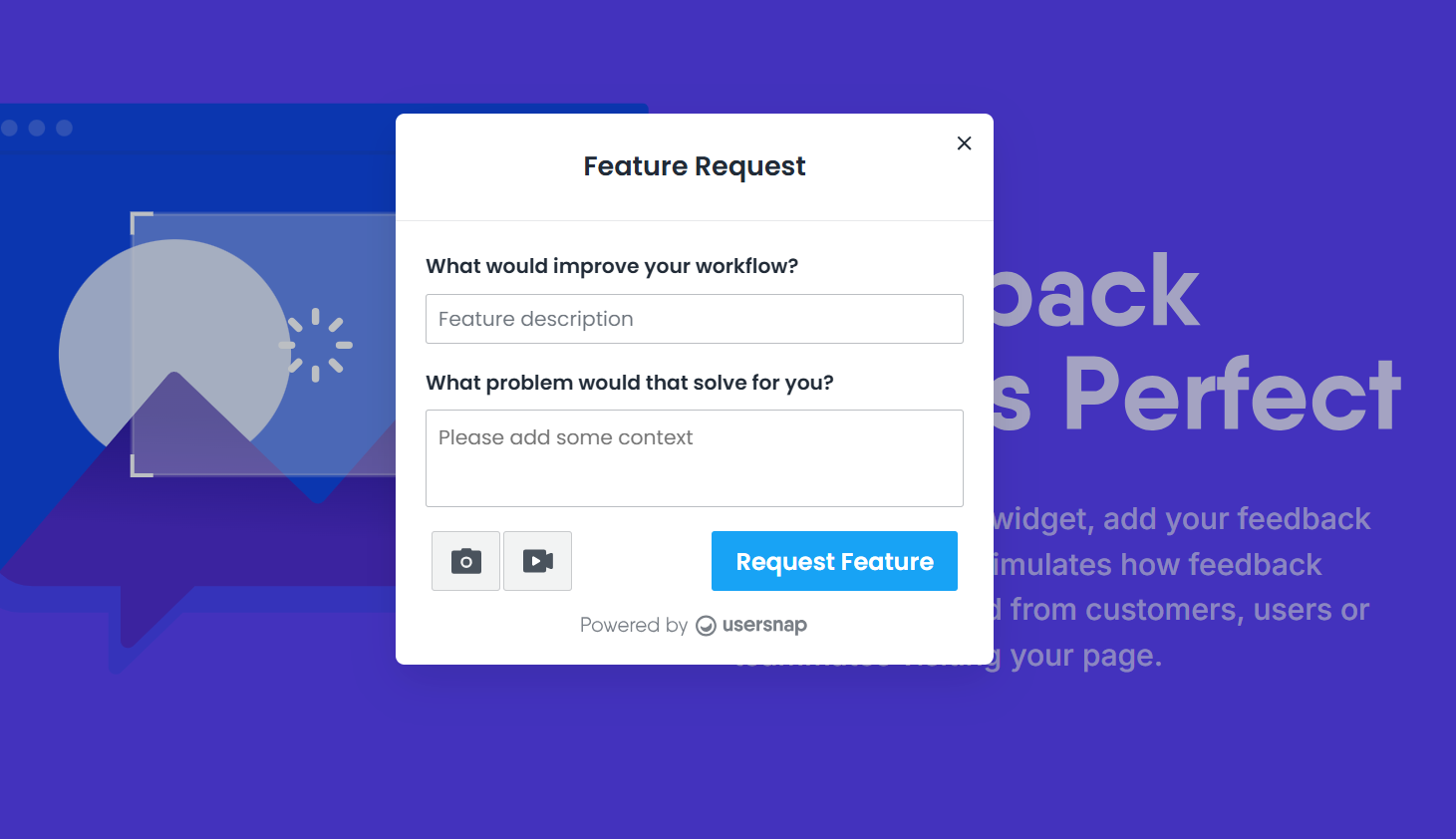
Recommended templates: Feature request, Customer Product Health Check, Opportunities Discovery, New feature poll. Use conditional logic for deeper qualitative research.
Micro-surveys (NPS, CES, CSAT). Use targeted templates for specific signals:
- User satisfaction (CSAT) to track support and product satisfaction
- NPS to track loyalty
- Customer effort to measure usability
- Feature satisfaction to measure how valuable existing features are
Pro tip. Use the email survey collection type to embed micro-surveys with raters into conversations with customers, measuring satisfaction with the feature discussed or the call itself.
2. Consolidate feedback in one dashboard
Once feedback starts coming in, the next step is to organize it so patterns become visible. Usersnap's centralized dashboard collects all feedback types (bugs, requests, surveys, calls) into one view where you can:
- Group similar feedback using labels
- Apply up to 10 custom statuses to track progress
- Prioritize using priority fields
- Manage workflows in Kanban view per project
- Reply to submitters directly from the dashboard, with optional CC/BCC for stakeholders
AI-powered Automations handle labelling automatically through Topics, clustering similar feedback into themes without manual tagging.
Example. If 50 users ask for "being able to edit multiple items at once," AI clusters them automatically and tags them under Topic: bulk-task-editing. You see one prioritized opportunity instead of 50 disconnected requests.
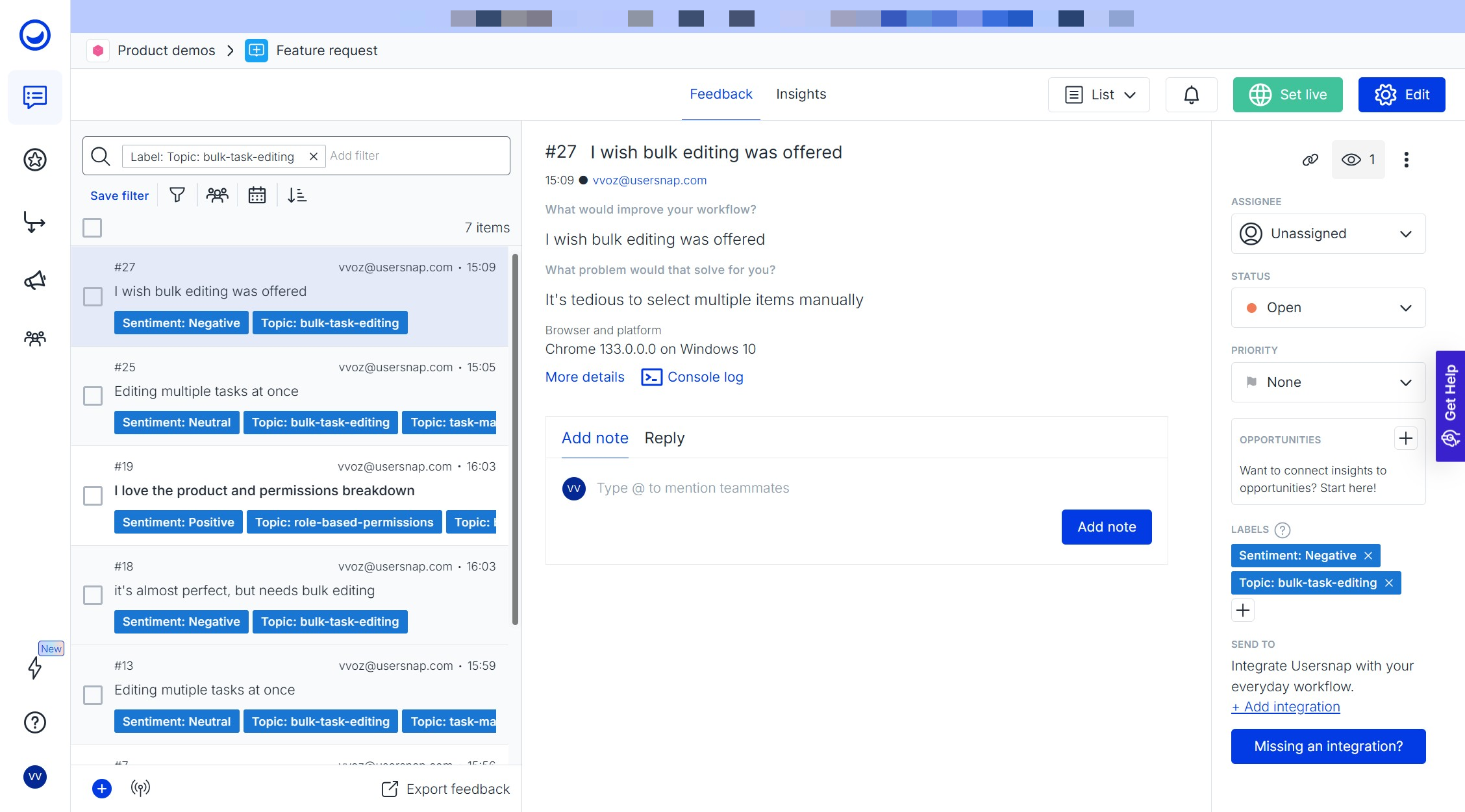
3. Analyze patterns and sentiment
After feedback is organized, the next step is to identify the most important trends and translate them into actionable hypotheses.
Consolidate and tag feedback automatically. The Sentiment Sensor analyzes incoming feedback and tags each item with a topic and a sentiment label. It then surfaces the top 3 positive and top 3 negative trending topics. Click into each sentiment trend to see the actual feedback items that contributed to it, the real user quotes behind the numbers.
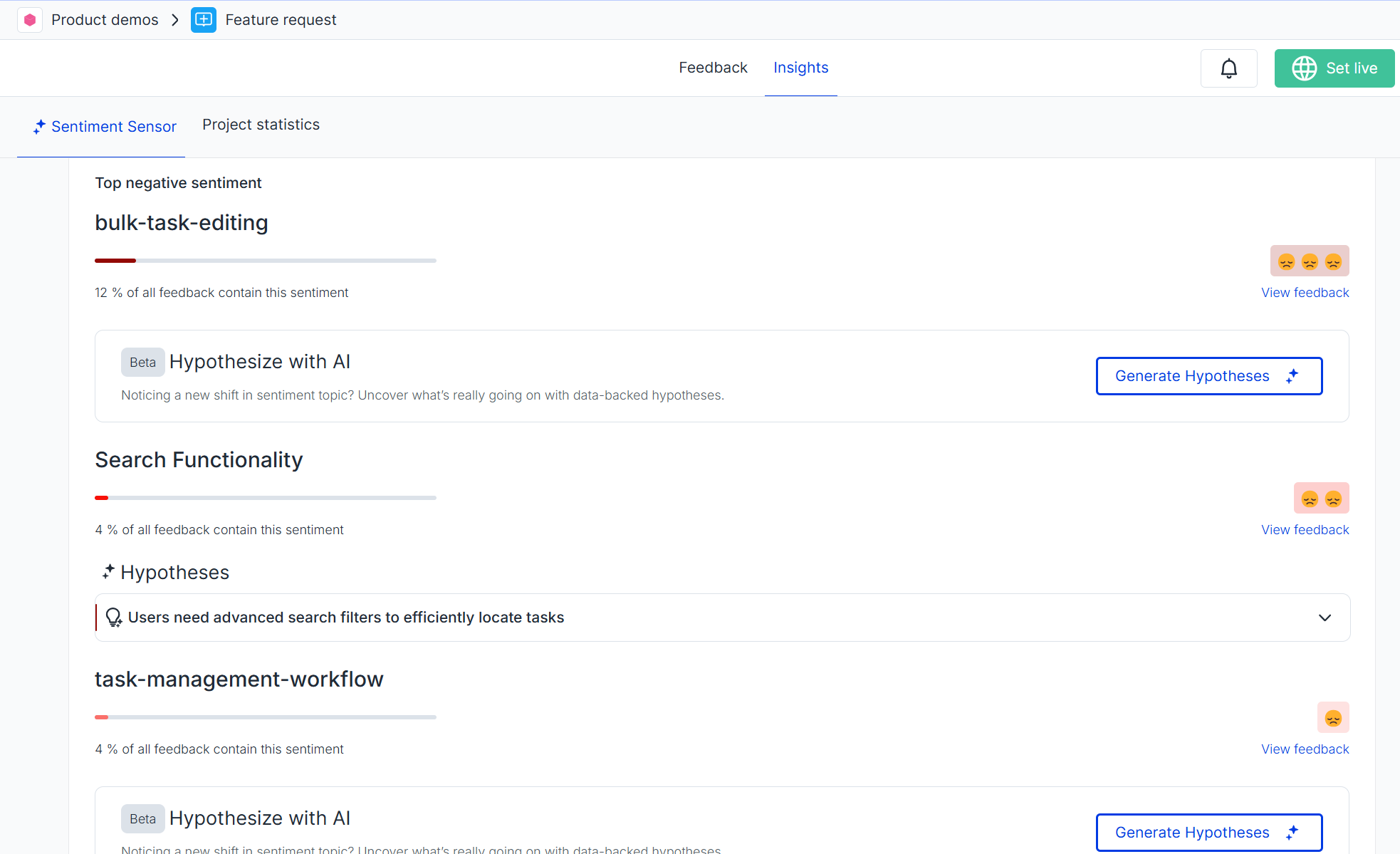
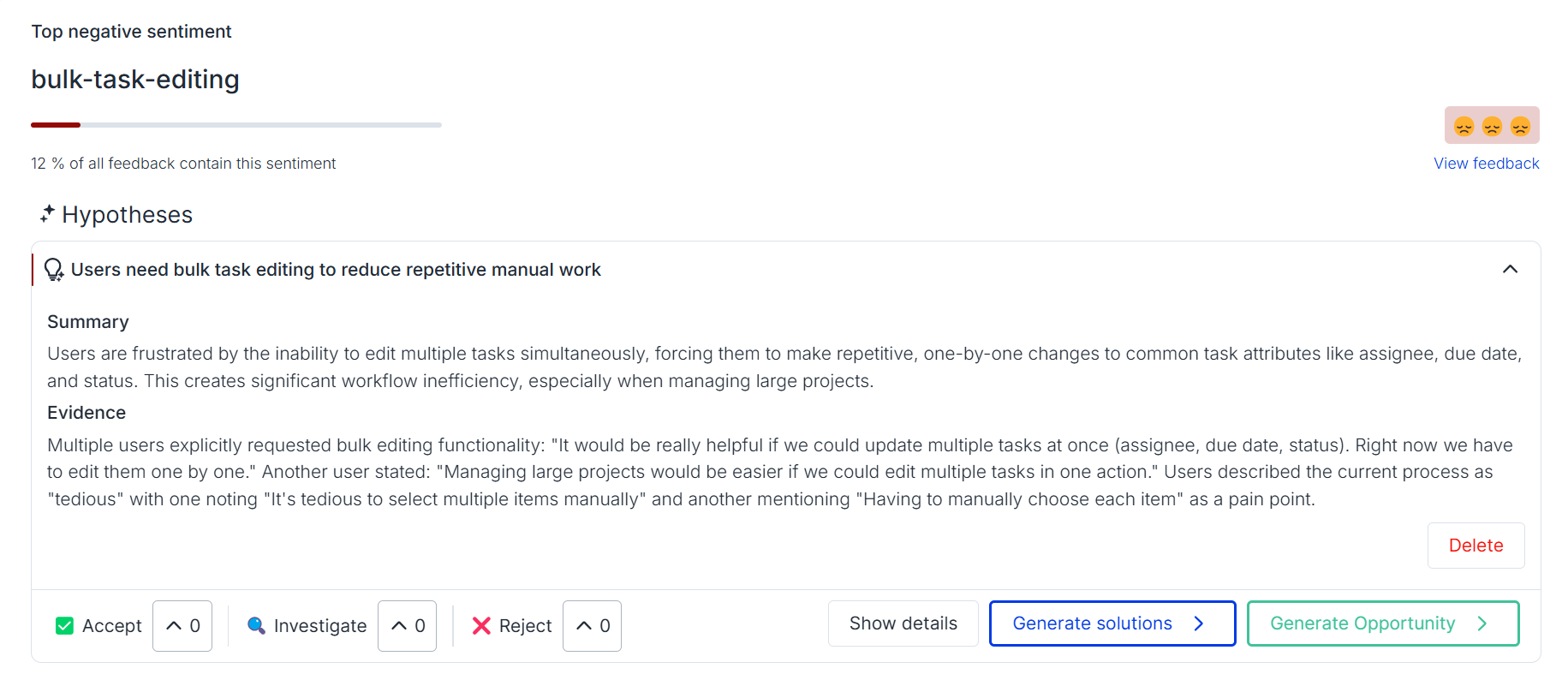
Turn sentiment into a hypothesis and a solution. Once you've spotted a negative trend, use the Hypothesis Generator and Solution Generator to translate the pattern into a testable idea.
- Identify the issue from the negative trend. Example: "Users express frustration with the task completion flow."
- Generate a hypothesis. The Hypothesis Generator suggests a root cause: "Users can't find checkout steps."
- Generate a solution statement. The Solution Generator proposes a fix: "Rename buttons and add in-app hints."
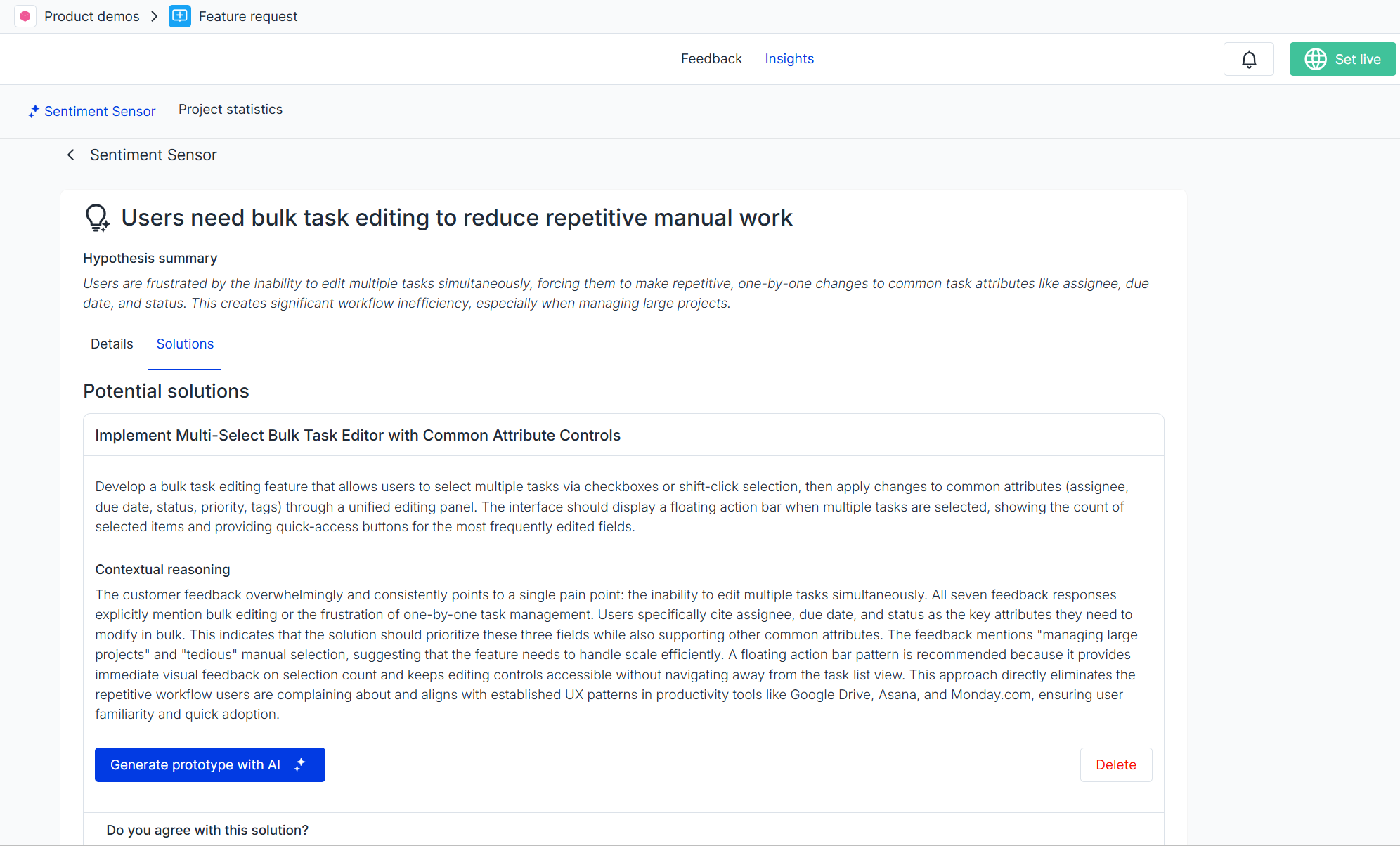
Visualize the solution with Alloy. Once a solution concept is defined, use the Alloy integration to quickly generate a UI prototype based on your product context, so the next stakeholder review is a clickable mock, not a Loom.
4. Transform feedback into roadmap opportunities
To turn validated patterns into a prioritized roadmap, use the Opportunities Board, where you can:
- Create opportunities from existing feedback items or hypotheses
- Centralize context and evidence inside each opportunity
- Score and prioritize each opportunity by impact and feasibility
- Use the Kanban layout to visualize, track, and filter the roadmap
- Connect opportunities to Jira with two-way sync
This way, instead of building individual feature requests, you focus on solving underlying problems, with the customer evidence attached to every opportunity.
 in Usersnap showing prioritized roadmap opportunities with linked customer evidence](https://files.readme.io/29a85a5759b39b1e9069dbf794f370f6abbfbc1564ee21ae1904277d202d0e71-pm3.png)
5. Collect structured QA feedback
Once you've decided what to build, validate the work and catch issues before release. Usersnap supports QA and beta testing with the same widget infrastructure used for end-user feedback.
Features to use:
- Screenshot annotations
- Console log recorder
- Metadata and custom data
- Assignee fields
- Required fields for structured submissions
Recommended templates: Beta QA, Advanced bug tracking, Acceptance Testing (UAT).
6. Engage users with announcements and public boards
Usersnap supports two-way communication, not just feedback collection. Keep users informed about what you're shipping and what's next.
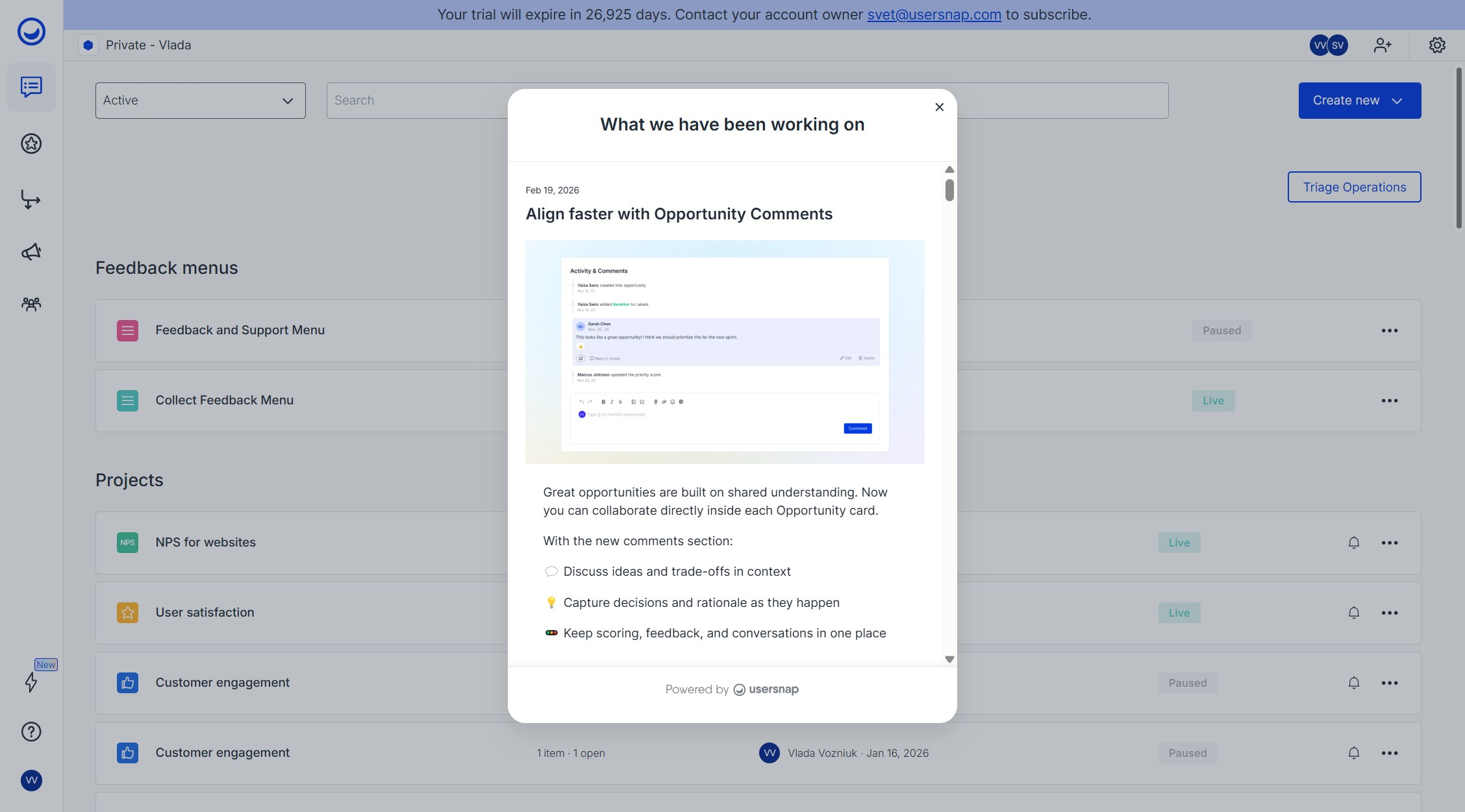
Announcements and changelog. Use Announcements to notify customers about new releases, feature improvements, bug fixes, and roadmap plans. Store all product news in a public changelog. Announcements can also be used to invite customers to interviews or check-in calls.
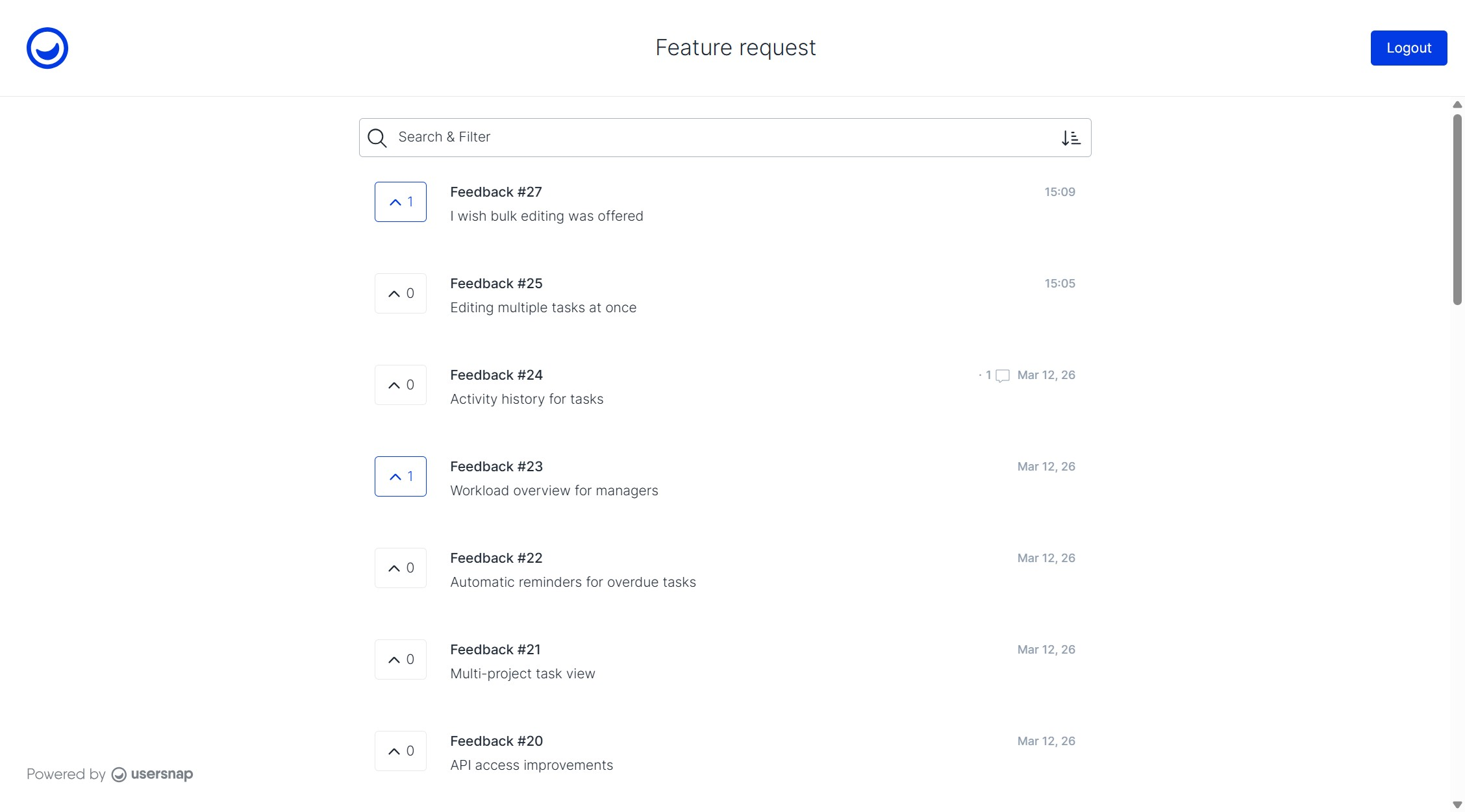
Public board. Usersnap's public board lets you collaborate on feedback with guest users:
- Share project overviews with freelancers, clients, or stakeholders from other departments
- Let users upvote and comment on feedback items to surface the most-wanted improvements
- Run a lightweight ticket portal or feature voting workflow
7. Measure feature success after release
After a feature ships, validate whether it actually solved the original problem. Usersnap helps PMs measure adoption, identify remaining friction, and guide the next iteration.
Measure feature satisfaction. Use a Feature Satisfaction widget that appears after users interact with the feature. For example, after launching a new custom reporting feature: "How satisfied are you with the new reporting functionality?" (1-5 rating or thumbs up/down).
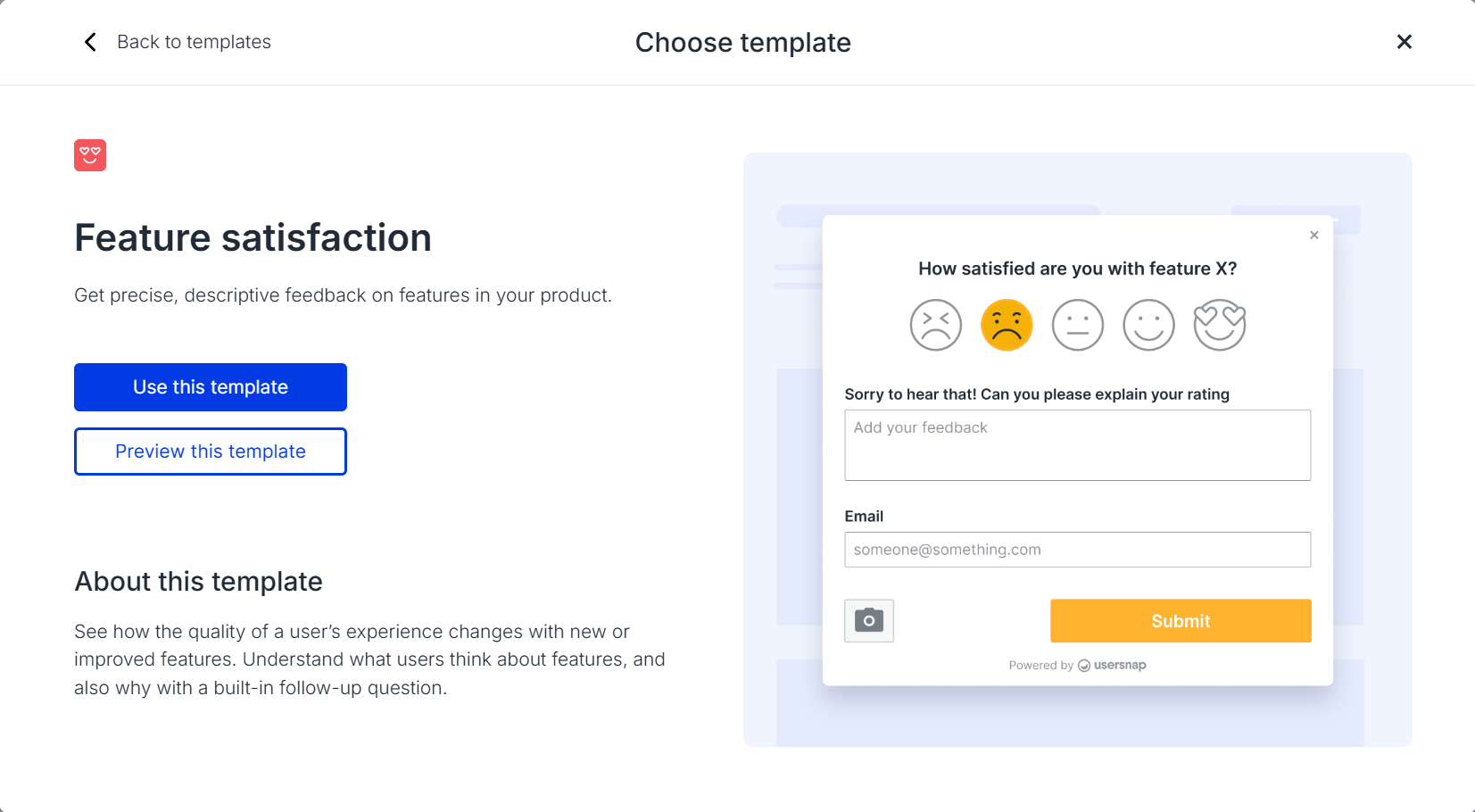
Ask follow-ups with conditional logic. Ratings alone don't explain why users feel a certain way. Use conditional questions to gather deeper insights:
- Low rating follow-up: "What is missing from this feature?" / "What task were you trying to complete?"
- High rating follow-up: "What do you find most useful about this feature?" / "What would you like to see next?"
Use feedback to plan the next iteration. A typical post-release loop:
- Release the feature
- Collect satisfaction ratings and qualitative comments
- Identify common patterns using Sentiment Sensor and Insights
- Turn recurring issues into new opportunities on the Opportunities Board
Example. Feature launched: Dashboard filters. Feedback pattern: top negative sentiment is "no way to save filter presets." Next step: create an opportunity for "Saved dashboard filters."
This process ensures product improvements are based on real usage and user feedback, not assumptions. Close the loop by replying directly in-dashboard to the users who originally requested the feature.
When should a product manager set up Usersnap?
Most PM teams set up Usersnap for one of four plays:
- Continuous discovery. Capture customer interviews, sales calls, and support escalations through the Channels Data Ingestion framework. Pair with the AI Ingestion Product Discovery template for a ready-made setup.
- Bug and QA workflows. Run structured bug reporting, beta testing, and UAT with shared widget templates and Jira sync.
- Prioritization with evidence. Use the Opportunities Board plus Sentiment Sensor so roadmap decisions carry the customer quotes that justify them.
- Post-release validation. Use Feature Satisfaction widgets to measure whether a shipped feature actually solved the problem, with conditional logic for the why.
Common questions
Do I need a separate tool for surveys, bug reports, and product discovery?
No. Usersnap covers all three in one platform: bug reporting widgets, multiple survey types (NPS, CSAT, CES, Feature Satisfaction), and a product discovery workflow with Opportunities Board, Sentiment Sensor, and AI-powered Topics. Consolidating into one tool means feedback from every source lands in the same dashboard, with the same labels and the same prioritization.
How does Usersnap integrate with Jira and other product management tools?
The Opportunities Board has two-way sync with Jira, so opportunities flow into engineering planning and status updates flow back. Usersnap also supports webhooks and a REST API for custom integrations, plus native connectors for Slack, Microsoft Teams, Zoom, and other product workflows.
Which AI features does Usersnap offer?
Usersnap's AI features include Sentiment Sensor, AI-powered Topics (auto-clustering), Hypothesis Generator, Solution Generator, Alloy prototyping, as well as Channels, the data ingestion tool that turns raw customer conversations from call and support tools into structured product discovery insights.
To use the Sentiment Sensor with all related features (Topics, Hypothesis Generator, Solution Generator and Alloy prototypine), you need to opt-in in the Insights section. Channels is available automatically on eligible accounts, but no customer data is collected until you connect and configure a data source. See the pricing page for current plan-level availability.
Can I use Usersnap for customer interviews and call analysis?
Yes. Through Channels, Usersnap connects to call recording and conversation tools including Zoom and Gong, with Google Meet coming soon. Call transcripts flow in automatically as feedback items, with AI auto-tagging by theme and sentiment, so customer interviews, sales calls, and support escalations become searchable evidence next to in-app and survey feedback. Pair it with the AI Ingestion Product Discovery template for a ready-made discovery setup.
Related guides for product teams
- Channels Data Ingestion: the parent framework for ingesting external conversation data
- Opportunities Board: turn feedback patterns into a prioritized roadmap
- Automations and Sentiment Sensor: AI-powered auto-tagging and sentiment scoring
- Zoom integration: import call transcripts as feedback items
- AI Ingestion Product Discovery template: ready-made setup for continuous discovery
- Sister role guides: Usersnap for Dev teams, Usersnap for CS teams, Usersnap for Marketing teams
- Usersnap pricing and plans
Turn customer feedback into product roadmap evidence. Start free with the first 20 feedback items, no time limit and no credit card. Start free · Book a demo
Updated 4 months ago